The automotive sector is undergoing an accelerated digital transformation. More and more buyers are searching for information and purchasing vehicles online. To take advantage of this trend, Google has launched Vehicle Ads, a new ad format that allows dealers to show their cars for sale directly in search results. This powerful tool offers great opportunities to boost visibility and sales.
Although this product has already been available in the US since 2022, its arrival in Europe 🇪🇺 is happening gradually, with the launch in December 2023 in the United Kingdom 🇬🇧 (UK) and its upcoming arrival in France 🇫🇷 and Germany 🇩🇪 during Q2 2024 and in the second half of the year for Spain 🇪🇸, Italy 🇮🇹 and the following countries.
Contents
What are Google Vehicle Ads and how do they work
Benefits of using Vehicle Ads for dealerships
How to set up a Vehicle Ads campaign step by step
Tips for optimising your vehicle ads
Measure and analyse your campaign results
The future of online car sales and Google’s role
What are Google Vehicle Ads and how do they work
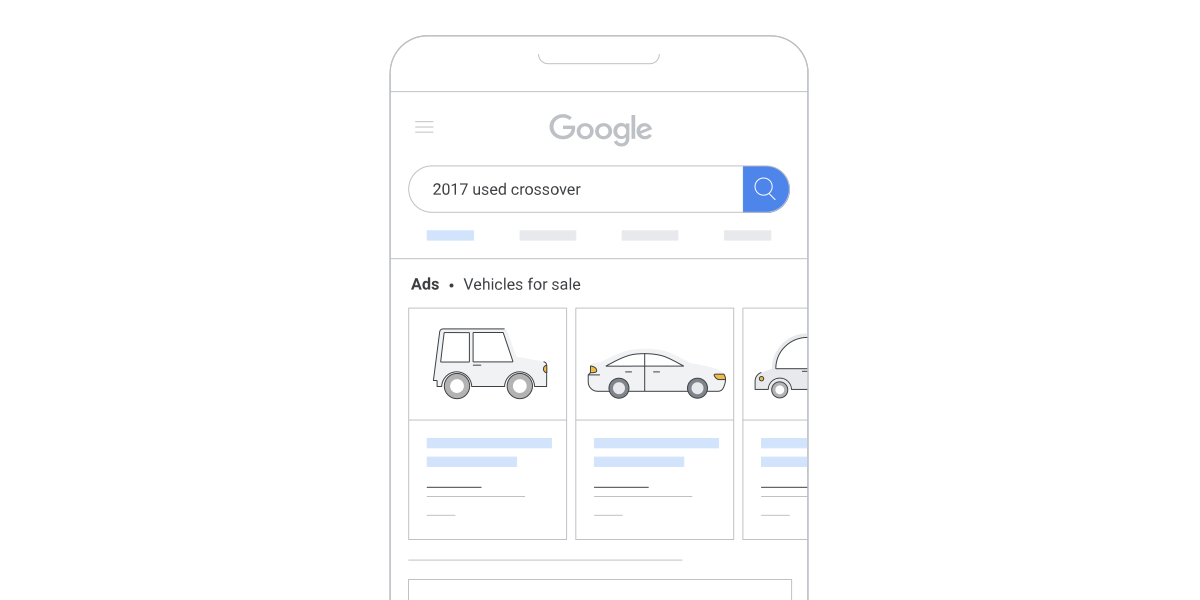
Vehicle Ads are a new ad format in Google Search that shows nearby vehicles for sale to users when they make queries related to buying cars. For example, if you search for "buy Renault Megane", ads featuring vehicles of that make and model for sale near your location will appear at the top of the results.
These ads appear as a card with key vehicle information: image, make, model, price, advertiser name and geographical location. When clicked, the user lands on a detailed description page on the dealership’s website, where they can request more information, book an appointment or buy the car directly, provided the seller has a transactional website. ⚡️⚡️
Unlike traditional search campaigns based on keywords, Vehicle Ads uses product feed data to show relevant ads according to the query entered. This makes it a very powerful and precise tool for the automotive sector.
Benefits of using Vehicle Ads for dealerships
Taking advantage of Vehicle Ads offers numerous benefits for vehicle dealerships:
Greater visibility: Your cars are shown at the top of Google search results when users are looking to buy a vehicle, which greatly increases the visibility of your inventory.
Alternative channels to traditional marketplaces: Your cars will have another alternative way to be advertised beyond paid marketplaces such as coches.net, wallapop , milanuncios...
Attract qualified customers: By showing ads only to users interested in buying a car, the chances of attracting qualified leads and making sales are much higher.
Expand geographical reach: You can show your vehicles to buyers from any location, allowing you to extend your reach beyond your local area.
Sell faster: By making it easier for users to see key information and contact you or buy directly, the sales process is sped up.
Detailed data: You gain valuable data on your ad performance, allowing you to continuously optimise your campaigns.
Take advantage of a new trend: Being present in this new format allows you to get ahead of the competition and benefit from the growing online vehicle sales.
According to a KPMG survey, 62% of Spanish executives in the sector expect that by 2030 most new car sales will be carried out online. Vehicle Ads allows you to prepare for this paradigm shift.
Requirements for using Google Vehicle Ads
To be able to advertise on Google as a Vehicle Ads advertiser, 3 things are needed
Account in Google Merchant Center
Own website with the ability to reserve the vehicle
Multi-posting system, such as that offered by some providers like www.dealcar.io
How to set up a Vehicle Ads campaign step by step
Setting up Vehicle Ads campaigns is similar to Shopping campaigns, as it is also based on a Google Merchant Center product feed. Follow these steps:
Request access: For now, Vehicle Ads is only available in the United States, Australia and Canada. If you operate in those countries, request access by filling in this form.
Prepare your product feed: Make sure your feed contains all the required information: product identifier, images, links, prices, etc. You can check the required fields here.
Upload the feed to Google Merchant Center: Use Merchant Center tools to upload and validate your product feed with the vehicles you want to advertise.
Set up your business profile: Check that your business profile details in Merchant Center are up to date and correct.
Create the campaign in Google Ads: Link your Merchant Center account with Google Ads and create a new Shopping campaign by enabling the Vehicle Ads option.
Define the strategy: Set the budget, bids, target locations and any other targeting you need.
Measure and optimise: Closely analyse the performance of your vehicle ads and make the necessary adjustments to improve results.
Once set up, your Vehicle Ads campaign will show your cars for sale in Google search results whenever a user makes related queries.
Tips for optimising your vehicle ads
To get the most out of your Vehicle Ads campaigns, apply these optimisation recommendations:
Use attractive titles and descriptions: Write persuasive copy that highlights the most appealing features of each vehicle.
Segment by vehicle type: Create separate campaigns or ad groups for new cars, used cars, price ranges, etc. This will allow you to fine-tune your bids.
Apply advanced bidding strategies: Test higher bids for in-demand models, specific locations or more valuable queries.
Take advantage of ad extensions: Use extensions such as call, location or action links to make conversion easier.
Monitor inventory: Make sure your feed is always up to date to avoid showing vehicles that have already been sold.
Analyse search terms: Review search term reports regularly and implement negative keywords if necessary.
Measure and analyse your campaign results
Once your Vehicle Ads campaigns are up and running, it is crucial to measure and analyse their performance in order to optimise them continuously. Some key metrics to monitor are:
Impressions and visibility: Check that your ads are appearing for relevant queries and with a good impression frequency.
Clicks and CTR: Analyse how many clicks your ads are receiving and their click-through rate (CTR) to identify opportunities for improvement.
Conversions and return on investment: Ultimately, what matters most is how many sales or leads you are generating and the return you are getting from your advertising investment.
Search terms: Review search term reports to spot new opportunities or queries where you should be present.
Use this information to adjust your bids, budgets, targeting and any other aspect of your campaigns with the aim of maximising results.
The future of online car sales and Google’s role
The COVID-19 pandemic accelerated the digital transformation of the sector and the rise of e-commerce applied to vehicle sales. According to consultancy EY, 65% of buyers would be willing to purchase their next car entirely online.
In this new scenario, Google tools such as Vehicle Ads take on critical importance so that dealerships can adapt and make the most of digital market opportunities. As more buyers search for and buy cars online, being present with relevant and attractive ads on the leading search engine will be key to success.
Therefore, dealerships that anticipate this trend and invest in innovative formats such as Vehicle Ads will be better positioned to attract online customers and maintain a profitable business in the future. Google will continue launching new advertising solutions tailored to the sector, so staying up to date will be essential.
In short, Vehicle Ads represents a great opportunity for dealerships.
The automotive sector is undergoing an accelerated digital transformation. More and more buyers are searching for information and purchasing vehicles online. To take advantage of this trend, Google has launched Vehicle Ads, a new ad format that allows dealers to show their cars for sale directly in search results. This powerful tool offers great opportunities to boost visibility and sales.
Although this product has already been available in the US since 2022, its arrival in Europe 🇪🇺 is happening gradually, with the launch in December 2023 in the United Kingdom 🇬🇧 (UK) and its upcoming arrival in France 🇫🇷 and Germany 🇩🇪 during Q2 2024 and in the second half of the year for Spain 🇪🇸, Italy 🇮🇹 and the following countries.
Contents
What are Google Vehicle Ads and how do they work
Benefits of using Vehicle Ads for dealerships
How to set up a Vehicle Ads campaign step by step
Tips for optimising your vehicle ads
Measure and analyse your campaign results
The future of online car sales and Google’s role
What are Google Vehicle Ads and how do they work
Vehicle Ads are a new ad format in Google Search that shows nearby vehicles for sale to users when they make queries related to buying cars. For example, if you search for "buy Renault Megane", ads featuring vehicles of that make and model for sale near your location will appear at the top of the results.
These ads appear as a card with key vehicle information: image, make, model, price, advertiser name and geographical location. When clicked, the user lands on a detailed description page on the dealership’s website, where they can request more information, book an appointment or buy the car directly, provided the seller has a transactional website. ⚡️⚡️
Unlike traditional search campaigns based on keywords, Vehicle Ads uses product feed data to show relevant ads according to the query entered. This makes it a very powerful and precise tool for the automotive sector.
Benefits of using Vehicle Ads for dealerships
Taking advantage of Vehicle Ads offers numerous benefits for vehicle dealerships:
Greater visibility: Your cars are shown at the top of Google search results when users are looking to buy a vehicle, which greatly increases the visibility of your inventory.
Alternative channels to traditional marketplaces: Your cars will have another alternative way to be advertised beyond paid marketplaces such as coches.net, wallapop , milanuncios...
Attract qualified customers: By showing ads only to users interested in buying a car, the chances of attracting qualified leads and making sales are much higher.
Expand geographical reach: You can show your vehicles to buyers from any location, allowing you to extend your reach beyond your local area.
Sell faster: By making it easier for users to see key information and contact you or buy directly, the sales process is sped up.
Detailed data: You gain valuable data on your ad performance, allowing you to continuously optimise your campaigns.
Take advantage of a new trend: Being present in this new format allows you to get ahead of the competition and benefit from the growing online vehicle sales.
According to a KPMG survey, 62% of Spanish executives in the sector expect that by 2030 most new car sales will be carried out online. Vehicle Ads allows you to prepare for this paradigm shift.
Requirements for using Google Vehicle Ads
To be able to advertise on Google as a Vehicle Ads advertiser, 3 things are needed
Account in Google Merchant Center
Own website with the ability to reserve the vehicle
Multi-posting system, such as that offered by some providers like www.dealcar.io
How to set up a Vehicle Ads campaign step by step
Setting up Vehicle Ads campaigns is similar to Shopping campaigns, as it is also based on a Google Merchant Center product feed. Follow these steps:
Request access: For now, Vehicle Ads is only available in the United States, Australia and Canada. If you operate in those countries, request access by filling in this form.
Prepare your product feed: Make sure your feed contains all the required information: product identifier, images, links, prices, etc. You can check the required fields here.
Upload the feed to Google Merchant Center: Use Merchant Center tools to upload and validate your product feed with the vehicles you want to advertise.
Set up your business profile: Check that your business profile details in Merchant Center are up to date and correct.
Create the campaign in Google Ads: Link your Merchant Center account with Google Ads and create a new Shopping campaign by enabling the Vehicle Ads option.
Define the strategy: Set the budget, bids, target locations and any other targeting you need.
Measure and optimise: Closely analyse the performance of your vehicle ads and make the necessary adjustments to improve results.
Once set up, your Vehicle Ads campaign will show your cars for sale in Google search results whenever a user makes related queries.
Tips for optimising your vehicle ads
To get the most out of your Vehicle Ads campaigns, apply these optimisation recommendations:
Use attractive titles and descriptions: Write persuasive copy that highlights the most appealing features of each vehicle.
Segment by vehicle type: Create separate campaigns or ad groups for new cars, used cars, price ranges, etc. This will allow you to fine-tune your bids.
Apply advanced bidding strategies: Test higher bids for in-demand models, specific locations or more valuable queries.
Take advantage of ad extensions: Use extensions such as call, location or action links to make conversion easier.
Monitor inventory: Make sure your feed is always up to date to avoid showing vehicles that have already been sold.
Analyse search terms: Review search term reports regularly and implement negative keywords if necessary.
Measure and analyse your campaign results
Once your Vehicle Ads campaigns are up and running, it is crucial to measure and analyse their performance in order to optimise them continuously. Some key metrics to monitor are:
Impressions and visibility: Check that your ads are appearing for relevant queries and with a good impression frequency.
Clicks and CTR: Analyse how many clicks your ads are receiving and their click-through rate (CTR) to identify opportunities for improvement.
Conversions and return on investment: Ultimately, what matters most is how many sales or leads you are generating and the return you are getting from your advertising investment.
Search terms: Review search term reports to spot new opportunities or queries where you should be present.
Use this information to adjust your bids, budgets, targeting and any other aspect of your campaigns with the aim of maximising results.
The future of online car sales and Google’s role
The COVID-19 pandemic accelerated the digital transformation of the sector and the rise of e-commerce applied to vehicle sales. According to consultancy EY, 65% of buyers would be willing to purchase their next car entirely online.
In this new scenario, Google tools such as Vehicle Ads take on critical importance so that dealerships can adapt and make the most of digital market opportunities. As more buyers search for and buy cars online, being present with relevant and attractive ads on the leading search engine will be key to success.
Therefore, dealerships that anticipate this trend and invest in innovative formats such as Vehicle Ads will be better positioned to attract online customers and maintain a profitable business in the future. Google will continue launching new advertising solutions tailored to the sector, so staying up to date will be essential.
In short, Vehicle Ads represents a great opportunity for dealerships.